Blog Archives
6 Softball Things I’m Grateful for: 2024 Edition

With Thanksgiving coming next week it seemed like a good time to offer up a potpourri of things in the softball world for which I am thankful.
Now, this isn’t going to be one of those sentimental posts where I talk about how thankful I am for my understanding wife who lets me spend so much time working with other people’s kids, or my supportive family, or the opportunities I have to work with my students and their families, or all the people over the years who have and still continue to help me expand my knowledge of the sport and how to teach it, or you, my readers. That would be lame, right?

Instead, I thought I would talk about more tangible things that we can all appreciate. In other words, stuff.
After all, what good does it do you if my wife is awesome? But the items on this list are things that you can easily benefit from as well if you’re willing to put the time and/or money to take advantage of them.
So without further preamble, here are some of the softball things I am grateful for in 2024. If you have anything you’d like to add, please throw them into the comments below.
New GameChanger Home Page
This probably won’t mean much to a lot of you, but for me it was a literal game changer. If you follow multiple teams and haven’t seen it yet I’m sure you’ll love it too.
Most users probably only follow one or maybe 2-3 teams per season, so it was easy for them to keep track of when game were happening. I, however, typically am following dozens of teams where I have students playing.
When a team I am following is playing I typically receive a notification on my phone. On a typical summer or fall weekend my phone might get pinged 10-20 times an hour.
Prior to this fall, if I clicked on one of those notification I could see what was happening in the game. But if I forgot which team it was later I couldn’t check back on it until I received the notification the game was over.
This fall, GameChanger changed the home screen to list every game for teams I’m following that is currently happening at the top, upcoming games in the middle, and then final results for the day (I presume) at the bottom. So all I have to do to see what’s happening is open the app and click on whatever game I want to check out and the game tracker opens.

When I’m done and click the X to close the game, it goes right back to the game listings rather than that team’s home page. I can now check out a dozen games quickly. Brilliant!
If you’re a coach like me who wants to keep track of his/her students, a program director who wants to keep an eye on all of your organization’s teams, or even a grandparent whose children took the phrase “Be fruitful and multiply” to its logical conclusion, you’re going to love this great new way they’ve organized the info.
OnForm Video Analysis Tool
I’ve talked in the past about what a great tool OnForm is. OnForm makes it easy to capture, analyze, organize, and share videos and analysis to help coaches communicate with players so the players can get better.
I use it on a daily basis with my own students. But every now and then I receive a video from a parent looking for a little help or a coach looking for a second set of eyes on a player.
Often those videos are shot with the phone’s native video app. But OnForm makes it easy to import those videos into the app so I can provide slow motion or even stop motion analysis, complete with all the drawing and other tools it offers.
I can even do side-by-side comparisons to show what the player looks like compared to a more high-level player.
It’s just a great all-around tool whether you’re working with one player or 100 (although once you get past one it does get considerably more expensive).
Now, if they will just add the ability to superimpose a clock face over the video and give you the ability measure degrees of an arc from wherever you start to wherever you want to stop so you can check the angle (such as from the ground to where a pitcher’s humerus is at the time the front foot lands) I’d be a totally happy camper.
A Softball Bag with Wheels
This may seem like an odd thing to care about but in my opinion a bag with wheels that can store and transport up to four dozen softballs is one of the greatest inventions ever. Anyone who does outdoor practices in particular, like I do in the summer, should feel the same.
Consider you’re working with a hitter who did a good job of hitting the ball where it was pitched, which means the balls are sprayed all over the outfield.
If you have to carry the ball bag out to pick them all up, and you’re working for 2, 3, 4, or more hours, it gets awfully heavy and tiresome. But if your bag has wheels you can just roll it around with you like luggage to pick them up.
Or even wheel the bag toward second base, toss all the balls in near it, and then pick them up and put them in. Much more efficient.
Then there are the team coaches who need to (or need their players to if they’re smart) lug a ball bag from the furthest reaches of the parking lot to the part of the complex the parking lot is farthest from. Sure, you can toss a regular ball bag in a wagon, but if you don’t need a wagon full of stuff a bucket with wheels is a whole lot easier to manage.
The only problem with those buckets is they can be really tough to find. I’ve bought essentially the same bucket multiple times under five or six different brand names.
It’s like a company thinks, “What a great idea,” slaps their name on a standing design, sells a bunch, then decides to get out of the business. At which point you the consumer has to wait until another company thinks it’s a brilliant idea so you can buy a replacement when you ultimately forget to put the handle down only to see one of your power hitters smash a line drive into it and dent the handle so it won’t slide up and down again.

Once they’re off-market you have to keep searching for them until they finally pop up again. At least the last time that happened to me, when I finally found the latest company to offer this apparent loser of an inventory item I bought two.
So I’m covered for at least a while.
If you can find them, buy one. You won’t regret it.
I Still Own A Working Diamond Kinetics Ball
Right now, if you want to check out the spin direction, spin rate, spin efficiency, and other parameters on a pitch you pretty much have two options: You can either spend multiple thousands of dollars to purchase a Rapsodo set-up or find somewhere or someone that has one and is willing to rent it out for a couple of hours.
But there used to be another alternative. Diamond Kinetics (DK) used to sell a DK softball for $99 that would do everything Rapsodo did, right on your phone or tablet. It took seconds to set up (basically you’d open the app, spin the ball, and if the ball was charged you were ready to go) and didn’t require any special lighting or WiFi conditions.
Sounds like a dream, right? DK stopped selling those balls a couple of years ago.
I’m not sure why, although I’ve heard a few rumors. But I sure wish they’d come out with a new version and start selling them again.
In the meantime, I’m glad my old one still works – even though the ball itself is getting a bit slick from all the times it’s been thrown. Still, it beats dropping a down payment on a car on a system that doesn’t work any better than a $99 ball.
The Ability to Shop on the Internet
Say what you will about the Internet and all its issues, especially relative to social media. When it’s time to purchase special items (like some of those above) or even everyday items such as bats, balls, gloves, workout equipment and more, there’s nothing like the ability to open your computer, tablet, or phone, do a quick search, and make the purchase without ever having to leave your home.
I come from the era where we actually had to get off the couch, drive somewhere, and then be stuck with whatever inventory the store you went to decided to stock. In most cases it was fairly cheap, mass appeal items rather than quality gear.

Today, though, I can not only search for the good stuff – high-quality gear that will perform well and will last – but I can also search for where I can buy it for the cheapest price. After all, price does still matter.
For you digital natives who never had to rely solely on brick-and-mortar stores, be grateful you live in the times you do. It beats traveling all the way to a sporting goods store only to find they don’t have what you want – or if they do have it it’s so bad you’re afraid it will break on the way to the cash register in the front of the store.
Quality Educational Materials on the Internet
Sure, there’s a lot of crap on the Internet regarding how to develop softball skills. Especially on social media where the goal seems to be more focused on getting clicks than teaching something worthwhile.
But there’s a lot of good out there as well. Hopefully you consider this blog one of them. But there are others as well.
For training pitchers, you can’t beat Rick Pauly’s High Performance Pitching certification program. Rick is an extremely knowledgeable pitching coach and a great presenter who makes it easy to understand what high-level pitchers do and how to teach it.
Sure, you can try to piece the same information together from multiple sources or YouTube/TikTok/Instagram videos. But Rick has put it all together in one place with proven techniques and strategies that will get you or your daughter or your players where you want to go faster.
The DiscussFastpitch Forum is another great resource where you’ll get ideas and opinions from all around the sport. It’s an open forum so you have to be a little careful about who and what you listen to, but if you invest some time on there you’ll figure out pretty quickly who knows their stuff and who doesn’t.
As a starter, I would recommend checking out the “sticky” threads that are pinned to the top of the pages you’re interested in. Their information has been vetted and proven itself over time.
There are plenty of other examples out there for all aspects of the game too. As long as you take a little time to learn what you should be looking for first you’ll find the info you need to become a better coach for your team or your own daughter.
Many Thanks
So there you have it, my list for 2024. If you’re in a country that doesn’t celebrate Thanksgiving, that’s a bummer.
It’s the ultimate holiday, because all you do is eat and watch sports. Unless, of course, you’re hosting, in which case all you do is spend the week before cleaning the home top to bottom and preparing food so all your guest can sit around eating themselves into a food coma and watching sports.
Luckily I’m in the former category this year.
But even if Thanksgiving isn’t a thing nationally, you can still be grateful you live in such an awesome time for the great sport of softball.
Happy Turkey Day everyone!
Cornucopia photo by Pixabay on Pexels.com
The Power of Using Video When You Practice

One of the tools I use the most when I give lessons is my iPhone. If I see a player making some sort of awkward or inefficient movement, out comes the ol’ phone and I immediately shoot a video I can show that player (and often her parent, guardian, team coach, etc.).
Now, I can stand there and tell the player what she’s doing without using video, but often it seems like they either think I’m exaggerating the movement they’re making or I am making it up entirely. I said that because it has little impact on what they’re doing, and they frequently will go right back to doing it.
But when they see the video, they suddenly know I was not exaggerating for comic effect but if anything was dialed back a bit on it. Seeing is believing, and believing enables them to start making the correction. Things usually get better from there.
That’s great during lessons. But what about the other 90% of the time, when the player is practicing on her own or with a teammate, parent, guardian, team coach, etc.?
There is a solution that will help shortcut the time-to-improvement. It involves a little practice secret that I’m now going to share with you.
The Revelation
These days pretty much everyone’s personal phone has the ability to shoot video. And those video capabilities can be used for more than a Snapchat or a Tik Tok dance video.
Why not set up the phone to the video setting, hit the “Record” button, then take a video of whatever skill she is trying to master? Then she can play it back, watch herself, and see if she is leading with her hips (if she is a hitter), getting some elbow bend over the back side of the circle (if she is a pitcher), or making whatever movement she is supposed to be making at whatever point she’s working on.
I know, genius, right?
Sure, when I shoot video I use the OnForm app so I can easily slow it down, scrub it back and forth, draw on it, measure angles, or do whatever else I need to do. It’s really cool to be able to do that, as I describe here.
But you don’t absolutely need all of that, especially if your coach has told what to look for/work on specifically. The basic video any smart device shoots is enough to give you eyes to see what’s happening and whether the movements that player is making are the movements that player SHOULD be making.
I know on an iPhone you can even scrub it back and forth by tapping on the video and then using one finger to move the little frames at the bottom back and forth. I imagine Android and other operating systems offer the same capabilities.
Different Learning Styles
So what makes video so valuable?
Science has documented that different people learn in different ways. Some of us learn better from reading directions. (Most of those people tend not to be male, as most males tend to jump in first and then only read directions when they get in trouble – usually halfway through the project.)

Some learn better from hearing things explained, the way it would typically happen in a lesson or team practice. “Suzy, you have to get your butt down on the ball.”
Some learn best by actually performing the skill we are attempting to perform. Although in my experience a lot of young players actually have trouble feeling whether they are doing something correctly while they are in the middle of it.
But the vast majority of us (65%) are visual learners. If we see it, we can understand what we’re supposed to do, or what we’re not doing now, better.
Yet when it comes to actual practice sessions, players and coaches rely almost entirely on the two weakest preferences for learning – auditory/listening to instructions (30%) or kinesthetic/doing it and feeling it (5%). Doesn’t make much sense, does it?
By incorporating video into the learning process players can learn faster by using the method most prefer. And even if they are in the other 35%, augmenting auditory and/or kinesthetic instruction with video is neutral at worst and a plus beyond that.
Video Power in Your Pocket
The beauty of all this is that it doesn’t require a lot of work. Today’s teen or preteen carries more video power in her pocket or purse than was available when Debbie Doom (yes, that was her real name, and what a great name it was) was dominating hitters, Lisa Fernandez and Sheila Cornell-Douty were winning gold medals in the Olympics, and Linda Lensch was becoming a USA Softball Hall of Famer.
All you have to do is take that device out of wherever it is, prop it against a nearby bench, bat bag, or rock, and hit “record!” Then you have instant feedback on where you are and whether what you’re practicing is making the player better – or worse.
She can even do it by herself. And if the coach says it’s ok, she can even send it to the coach’s phone or other device to receive additional feedback to make sure she stays on track.
That’s sure a lot faster and easier than the early 2000s, when I started coaching. Back then it was a production.
I had to bring a laptop and separate video camera, set up the camera on a tripod, connect the video feed to the laptop and then whatever video tool I was using, and then manipulate it all to run it back. I had to plan it all ahead too, and hope an errant throw didn’t knock out the camera or laptop.
Now it’s just pull out the phone, open the app, shoot, and review.
Opportunity Knocks
The opportunity here is tremendous, and the cost is nil if you already have a phone or tablet. So why wouldn’t you take advantage of it?
By incorporating video into their practice sessions players can learn more effectively – and reach their goals faster.
Seems like a no-brainer to me.
Phone photo by Wendy Wei on Pexels.com
Fastpitch Player’s Holiday Gift Guide

Ok, I know I’m a little late on this for Hanukkah but who knew it would be so early this year? I guess just bookmark it and have it ready for next year.
For those with holidays still coming up, however, here are a few ideas for gifts that I think will not only be good for immediate satisfaction but could potentially have an impact on your favorite player’s entire career. I am not including gloves or bats since you probably have already thought of those. I wanted to go a little outside the box.
And in case you’re wondering, no, I’m not being compensated by any of the companies mentioned or linked to for including them (or anything else for that matter). These are just products or services I’ve found to be valuable and think you will do.
Enough preamble. Let’s go shopping.
High-quality batting tee
This is an essential piece of equipment for any player. Even non-hitting pitchers can use it to practice locations as I showed in this post.
The typical use, of course, is for hitting. Tee hitting is for working on mechanics without the challenges of timing a moving ball. If you’re trying to get the proper sequence (hips-shoulders-bat), fix your bat path, learn to tilt properly or solve any other mechanics issues a tee is your best friend.
That said, there are a lot of choices for tees out there. I prefer one that doesn’t have a base that looks like home plate, because when it does look like home plate hitters tend to line up on the tee in a way that is not conducive to great hitting.
Tanner Tees were the original to develop the particular design I favor, although for durability (and resistance to getting easily knocked over) I really like the Jugs T. For younger players, or older players who have trouble with low pitches, the Jugs Short T is also a great choice. You can read more about the Short T in my product review here.
Jugs is also apparently coming out with a combo package that includes both heights. Doesn’t look like it will be available until next year, though, so maybe save it for a birthday or graduation gift.
Large, easy-to-set-up net
If you are getting a tee you’ll probably want to get a net to hit into. That way you can hit in the back yard, basement, garage, or other space without damaging your home or having to chase after the balls.
Bownet is probably the best-known brand at this point. You see their distinctive orange nets at pretty much every game and tournament (although they have a variety of colors available now). But Tanner, Jugs and others also have nets that will do just fine.
Of course, it’s not just hitters who can use a net like this. Pitchers can use one to practice their mechanics from a short distance. Field players and catchers can use them to develop their overhand throw velocity. And so on.
A net like this will pay for itself many times over. And when you’re done with it, if you’ve bought a good quality one you’ll be able to sell it and recoup part of your investment in cash. Pretty good deal overall.
Quality softballs
There’s something about working with nice, bright, shiny new softballs that helps players feel better about their practice time. After all, it’s a lot easier to take pride in your practice time if you’re not using crappy old, beat-up, dirty softballs.
That said, there are all kinds of softballs from many different manufacturers, from the really cheap to the really nice. It’s hard to know which ones to purchase.
My ball of choice right now is the Mark One NFHS 12″ softball. They are real leather balls with a .47 COR and raised seams, among other features.
What I like about them is they are comparable in quality to Worth Dream Seams but generally cost less. I use them for hours a day, nearly every day (including having hitters beat them into metal backstops on a regular basis) and they hold up well. They also have great grip so pitchers like to use them.
But check around the Internet and you can find several high-quality softballs to make your favorite player happy.
Video analysis app
I recently did an extensive product review on a video analysis app called OnForm. It has a lot of great features, including an auto-detect function that would allow a player to set up a device on a tripod and then have it record pitches, swings, throws, etc. when it sees motion.
But there are others out there as well. Kinovea is one that comes to mind, although you can only use it with a computer, not a phone or tablet.
With this type of software a player can record herself and scrub through it to see if what she’s doing is what she thinks she’s doing. Or she can send the video to a coach who can help her with it.
The value of being able to see yourself in slow or stop motion cannot be overestimated. In fact, high speed video analysis has been crucial to busting many myths and mis-teachings that grew up over the years.
If you can’t find a free version, find something you can afford. It’s worth it.
Polyballs
These are the pliable balls with different weights that you can use for a variety of different types of arm training. They’re great for pitchers, catchers and field players to help develop safe throwing mechanics and improve overall arm and shoulder strength.
Polyballs have grown in popularity over the last couple of years so there are a variety of sources from which you can obtain them. I personally use the balls from Velolab Softball, which comes with a free training program. Austin Wasserman’s High Level Throwing is another source, where they are called Lightning Balls.
One of the great things about them is you can throw them into concrete walls, or plywood, or pretty much any solid wall without damaging the wall or the balls. They make an audible “slam” sound too, so the harder you throw the more satisfying the sound. The lighter ones might even be able to be thrown into drywall, although I would test that theory in an out-of-the-way place first before tossing one in the living room.
Radar device
In my opinion, having some way to measure speed is critical to the development of pitchers, extremely helpful for overhand throwing, and even has some benefits for hitters. I like to call the radar the “pitcher’s accountability meter” because if she takes a pitch or two off, or goes the other way and tries to over-throw/over-muscle the ball, the radar calls her out immediately.
I am personally a huge fan of PocketRadar devices. The Ball Coach is good, but the Smart Coach is worth the extra money if you can swing it because it will not only capture the speed but enable you to embed it in a video capture at the same time. You can read my review of the Smart Coach here.
(If you use your PocketRadar often you’ll also probably make up for the cost difference pretty quickly with the money you’ll save using power blocks instead of alkaline batteries.)
Whatever brand you decide to get, however, my suggestion is to do it often rather than just bringing the radar out now and then.
If you only use it occasionally it becomes a big deal and the pitcher tends to tense up. If it’s part of a regular routine she will not be as intimidated and you’ll ultimately get better readings. I learned that lesson the hard way!
Pitching mat
There are a few good reasons to give your pitcher a good quality pitching mat for the holidays. One of which is saving wear-and-tear on your floors, especially if your pitcher has a heavy drag.
But beyond that, a pitching mat with a built-in pitchers plate can help pitchers learn to use the plate as part of their launch. A center white stripe can help them feel whether they’re going straight or striding out to the side.
If you do decide to get a mat one thing to check into is the type of backing it has. Some are better than others for different types of surfaces.
For example, a rubber backing will be great on a gym floor or other wood floor but may tend slip on turf. There are mats specifically designed for turf surfaces (although not all turf will hold the mat equally well), but they don’t translate too well to a fieldhouse or gym floor.
They have varying lengths as well. Some will extend roughly eight feel in front, pretty much covering the whole stride, while others are just designed to hold the pitcher’s plate itself. A little Internet research will turn up many options and sellers at various price points.
And for outdoors or long turf, the Portolite Mat with the spike backing will hold in conditions where other won’t. You can read my review of this product here.
Pitcher launch aids
One of the greatest challenges many pitchers face is getting a strong launch/leg drive. While some come by it naturally, most have to have it trained into them at some level.
The key is to get pitchers to get their hips moving out in front of the pitching rubber as they go into launch rather than sitting down on it. Three devices I’ve used to help them feel it are the Power Pod, the Softball Power Drive, and the Queen of the Hill.
Each of these goes about it in different ways. The Power Pod from Softball Excellence adds a little springiness to the initial move to go out, helping get away from “dead leg syndrome.” As a bonus, I also find it pretty handy for helping pitchers learn how to spin the curve and rise (although it wasn’t designed for that) and for teaching hitters to stride straight instead of away from the plate.
The Softball Power Drive, which is endorsed by Amanda Scarborough, helps pitchers feel the sprinter’s lean and forward angle of the body rather than sitting straight down on the pitching rubber. If they’re dragging the drive leg like an anchor they’ll feel it pretty quickly.
Then there’s the Queen of the Hill, which I’ve reviewed previously. Its sliding plate is great for teaching pitchers to drive their drive foot back instead of just running past it. If you push into it you’ll hear a “click-click” which tells you you did it right. If you don’t, no click.
You can also use these devices in combination. For example, put the Queen of the Hill behind the stride foot to encourage that foot to engage the ground before moving forward, and then the Softball Power Drive or Power Pod on the drive foot to encourage more drive as you come through.
Generating forward energy is critical to maximizing pitch speed. These devices can help.
PaulyGirl Fastpitch/High Performance Pitching online program
So, this is probably more of a secondary gift. I’d guess 99% of pitchers wouldn’t be interested in doing the training themselves, but if a parent or coach did the worked through the High Performance Pitching training program he/she could convey the information to the pitcher – at which point she would benefit greatly in my opinion.
Renowned pitching coach Rick Pauly has put together an extensive, detailed program broken into Beginner, Intermediate, Elite, and Professional levels. It’s all video-based and self-paced, which means you can go as slowly or as quickly as your time budget allow.
You can also pick and choose what you want. So if you just want help with the curveball you can take that module without having to go through the entire Elite level course.
If you’re interested in more information you can read this blog post which goes into much greater detail.
That’s a wrap
So there you have it – fairly exhaustive list. I could probably do more but if you’ve made it this far you’re already made of stern stuff. Have to stop somewhere.
Of course, for other ideas, you can use the search function in the left column and put in “Product Review.” You’ll no doubt find a few other ideas.
In any case, happy holiday shopping! Just remember, no matter what you buy it’s the archer, not the arrow, that really makes the difference.
Product Review: OnForm Video Analysis and Messaging Software

One of the most important tools a coach or instructor can have in their toolbox (and on their phone) is a video analysis app.
The ability to provide instant, visual feedback, including the ability to mark it up like John Madden diagramming a football play, is invaluable in helping players develop. As is the ability to review it later and offer more in-depth analysis.
I started many years ago with the mobile version of RightViewPro, then moved to Coaches Eye, which I’ve probably used for 10 years or more. It could be clunky at times, especially because if you wanted to be able to search for a particular player’s video later you had to manually tag each one after you shot it, but it got the job done.
Then in September I received an email from TechSmith, the creators of Coaches Eye, that they had decided to discontinue the product and would no longer be supporting it. They generously gave a one-year sunset period, but it meant I had to find a new app to use for my students.
I had played around with Hudl Technique before, but when I checked them out I discovered that product was also going away because it was being replaced by an app called OnForm, which is available on the Apple and Android platforms. I decided to check it out, and let me tell you I am very glad I did.
(At this point I think it’s important to point out that I purchased OnForm with my own money, and I am not being compensated in any way for this review nor do I get anything if you click a link or download the product. I have no affiliation with them whatsoever. I am strictly sharing my experience with the product to help you if you’re looking for a video analysis app for your own use.)
Core Usability
OnForm takes what most of us liked about Coaches Eye and similar apps and kicks it up a notch. For example, you can specify higher capture rates (up to 1080p) and shutter speeds to minimize blurring when you capture a video. Very handy, especially in the lower light conditions you typically find indoors.
Rather than storing all your videos on your device forever, OnForm lets you choose how long after you shoot them you want to keep them. After that they are stored in the cloud, where you can access them on-demand.
One of the best overall features, especially if you are a coach or instructor, is how the videos are organized. You create a folder for each player on the main page by clicking on the + button in the upper right hand corner and following the directions. You can choose whether you want to add a person for one-to-one coaching, add a team, or connect with another user who has sent you an invite code.

Once you’ve set up your first player, all the rest follow the same template for sport and role, so all you have to do is fill in the name. It just takes seconds to set someone up, but from then on you can open their folder and all the videos you shoot automatically are saved to that folder.
As someone who shoots a lot of video, sometimes in a single night, that is a huge time-saver. The videos within each folder are saved by date, and you can choose whether to share them with the player/parent automatically or just keep them to yourself. You can even import outside videos in other apps on your device, although only on a one-off basis unless you are importing them from Hudl Technique.
Live Analysis
Now let’s talk about usability. When you open the video you have a pretty standard toolset where you can mark straight lines and arrows, freehand lines and arrows, circles, squares/rectangles and even a single line that shows the degree of tilt or angle.

Additionally, there is an angle tool that not only lets you measure various angles initially but also enables you to change the angle if you did it wrong by clicking on it. Former Coaches Eye users will really appreciate that. Actually, you can do that with any of your markings but it’s particularly useful on the angle measurement tool.
You also have some interesting tools such as a stopwatch so you can measure how long it takes to execute a skill and a measurement tool that lets you mark distance. For the latter, think of measuring a hitter’s or a pitcher’s stride, or how far a bunt traveled, etc. As long as you know one reliable dimension you can mark that and OnForm will make the rest of the calculations for you.
Perhaps the coolest tool, and one they just added a couple of days ago (late November 2021 for those reading this later) is the skeleton tracking tool.
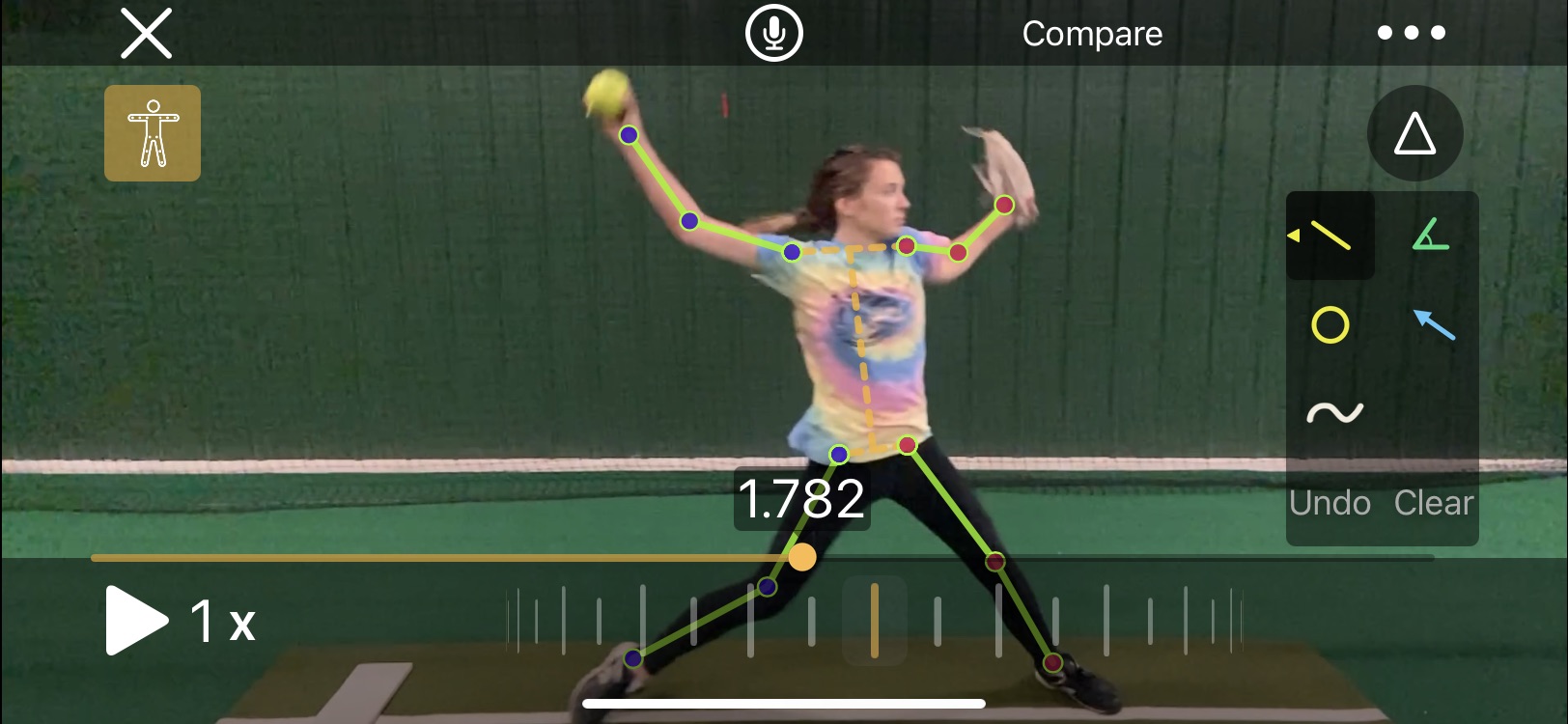
With the click of an icon OnForm will automatically mark every joint in the body and draw lines between them. Then, as you play or scrub the video, the skeleton lines will move with the player providing an unprecedented look at how how/she is moving through space. If the sequence of movements is important to you, you’re going to love this tool’s ability to display it.
Incidentally, the skeleton tracking overlay isn’t just for new videos. You can apply it to any video you’ve shot.
The toolset is rounded out by several additional capabilities, including:
- The ability to play videos through at full, 1/2, and 1/4 speed off a dropdown menu
- Two scrubbing tools – one which moves quickly through the movement, letting you go back and forth, plus a wheel that makes much finer movements so you can show subtle details
- An undo button to remove one line, circle, etc. at a time as well as a clear button to remove all markings
- A compare button that allows you to bring in a second video, whether it’s a previous video from that player or a pro example you’ve stored in a Reference Content folder, to provide a side-by-side comparison
- The ability to flip the video, which is handy if you want to, say, compare Cat Osterman or Monica Abbott to your right-handed pitcher
- Ability to trim the video to get rid of time between activities or other excess footage
- Editable titles and tags so you can mark exactly what was happening (such as which pitch a pitcher was throwing)
- Ability to edit the name, I suppose in case you got it wrong or the name changes
- Ability to save certain videos as favorites so you can find them more easily later
That’s a lot of capabilities, right? But we’re not done yet!
Recorded Analysis/Online Lessons
If you want to wait until later to analyze the video and then share the file with the player or parent, you can also do that. The Record feature gives you the option of recording the screen and live sound or just the screen.
You can pause the video in the middle or record straight through. Once it’s recorded it automatically plays a preview so you can check your work.
From there you can save the video as-is, trim the front or back, or discard it. If you’re happy with it you can share it directly through OnForm (if you’ve invited the player to join) or through email, messaging or some other app.
Pricing
Ok, now it’s time to get to the nitty-gritty. OnForm offers four different packages depending on your needs. Each comes with a one-week free trial so you can see whether it’s what you want. Be sure to double-checking pricing here since it may have changed since this blog post was written.
The first is a Free package that limits you to 10 videos in your account. If you don’t think you’ll be using it much, but want the option to shoot the occasional video, this one should work for you.
Next up is the Personal package, If you’re working with your own kids only (as opposed to coaching a team or being an instructor) this one should work for you. For $5/month or $49/year you can capture, store and analyze up to 500 videos as well as create up to 5 analysis videos in a 30-day period.
The Coach package (which is the one I have in case you’re interested) provides unlimited videos and analyses/voice over lessons for one coach, as well as allowing any invited athletes to upload unlimited videos to you for free. It also gives you the ability to create notes to go with each video and broadcast lists to reach multiple players at once. This package isn’t cheap, at $29/month or $299/year, but if you plan to use it a lot I think you’ll find it’s worth it.
Finally, OnForm offers the Team/Academy package, which includes everything in the Coach package along with the ability to create three (3) coach accounts rather than one so multiple coaches can access and use the same videos. That one is $69/month or $699/year. It’s probably best-suited to collegiate teams, large travel programs or facilities that offer teams.
My Take
So how is it in practice (no pun intended)? I think it’s tremendous, and a significant upgrade over the products I’ve used in the past.
Creating the videos and marking them up is fast, easy and reliable. They are really helpful with illustrating what is happening and what needs to be done. For pitchers I love being able to draw a single line and show the forward/backward tilt of their bodies.
As previously mentioned I love the way the videos are organized. Rather than having to come home and tag each video, they’re already in the right folders and available. I’ve even moved some videos into one of the Reference Content folders so I can easily call them up to show what famous fastpitch players do.
The analysis tools are easy to use as well, and I definitely love being able to easily discard a video and start over rather than having to wait for it to render (as I did in Coaches Eye) before I could delete one I knew went bad.
Do I wish it was cheaper? Of course, who wouldn’t? But the value is there, and OnForm is continuing to develop the product and add new features so as long as the value is there I think it’s worth paying the price.
Finally, there is their support. When I contacted them to ask why the skeleton tracking feature wasn’t showing up in my iPad they got back to me within 12 hours to explain you need an A12 chip or higher for that feature to be available.
Bummer, but at least they got back to me quickly which is great. They also have a way for users to request new features (I’m going to ask for a clock face drawing tool), and a blog to keep you up-to-date when something new is introduced.
I wholeheartedly recommend OnForm as a training tool for fastpitch softball players. As a bonus, you can use it for many other sports and activities as well, so if you have, say, a softball player and a golfer, one instance will work for both.
Check out the free one-week trial. I think you’re going to let what you find.






 Life in the Fastpitch Lane