Category Archives: Instruction
The One Tool Every Fastpitch Coach Needs in His/Her Bag

There are all kinds of devices and training tools available to fastpitch softball (and other) coaches today. A quick scan of Amazon or any sporting goods website will offer all kinds of ways to solve all kinds of problems at all kinds of price points.
But there is one tool today’s coaches need to make sure they have in their bags if they want to meet the expectations of many fastpitch players and especially parents today: a magic wand.
(Mine happens to be a Sirius Black model, as I’m sure Coach Katie McKay Phillips has already identified. If you don’t know who Sirius Black is, you really need to read more.)
The reason you need a magic wand is simple: many players and parents want to see instant improvement in individuals and teams.
They don’t want to spend hours practicing skills such as hitting, throwing, and pitching in the basement, backyard, or batting cages. They don’t want to spend hours out at the field learning their positions and what plays to make in specific situations or how to communicate where the ball will go.
Instead, they want you as the coach to wave a magic wand and take the team from looking like a group of misfit toys to a unit that can compete for tournament championships every weekend. So you’d best have a magic wand in your bag to show them you’re trying to give them what they want!
Now, of course, as any Harry Potter fan knows the wand is only as good as the wizard who wields it. So you’d best be practicing your spells and charms.
Once you have your wand, here are a few you can try. Some are directly from the Hogwarts courseware, while others are spells and charms of my own design.
Just remember, if you are a total Muggle and can’t get them to work, you’ll have to acquire the results the long, old-fashioned way – with lots of practice and repetition.
- Wingardium Leviosa – This one is one of the first Hogwarts students learn. It’s a levitation charm used to lift objects. Comes in mighty handy when your team can’t hit too well. Throw a little Wingardium Leviosa at a weak ground ball and watch it turn into a soaring line drive. You can also use it more subtly to turn a weak pop-up into a duck snort that sails just out of reach of every converging fielder. I’m sure you’ve seen that before.
- Expellliarmus – Good for when an opposing fielder is about to make a play that will result in a costly out. Originally designed to pull an opponent’s wand from his/her hand, it’s also great for turning a routine fielding opportunity into an instant error. No doubt you’ve seen this one being used by your opponents to make you look like you’ve never taught your players how to play. Naturally some coaches over-use it and then your team makes error after error, giving up a big inning. After all, the team couldn’t be that bad on their own after spending THE ENTIRE WEEK working on fielding ground balls and bunts.
- Petrificus Totalus – This is a full body binding spell that causes temporary complete paralysis. You have probably seen this one in action when your hitters were at the plate. The opposing pitcher throws a meatball down the middle of the plate and your hitter watches it go by for strike three. They didn’t freeze up on their own – they were hit with Petrificus Totalus by a wizard on the other side of the field. What other explanation could there be?
- Oblivius – This one is really handy becaue it enables you to erase the memory of people or events you don’t want someone to remember. It can be used in a couple of different ways. When used on opponents you can cause them to forget what to do with the ball on defense so they just stand there confused, holding it and looking around. No doubt you’ve seen this one in use as well. For your own team, you can use it when your pitcher just gave up a home run or other big hit to an opposing hitter and has now lost total confidence in herself and her ability to throw a strike. A little Oblivius and she’s right back in there. Coaches can also use it on themselves to forget bad innings or entire games before it gives them ulcers.
- Accio – The summoning spell that brings things to you. You’ll have to teach it to your players so the ball goes to them. How else do you explain a sure home run that hits a phantom gust of win and stays in the yard so the worst fielder in the game can catch it?
- Confundus Charm (Confundo) – Ever see three fielders converge on a ball only to let it drop between all of them? That’s Confundo in action.

- Instanteous Pitchus – Learning to pitch can be a long, arduous journey filled with hard work and major disappointments. But it doesn’t have to be. If you use this charm correctly you can turn any wannabe-pitcher into an instant ace in just one lesson. Which is what many parents expect of their coaches. No long, boring practice time or hours spent chasing balls around a backstop. Any pitcher can go from zero to hero if you apply this charm.
- Sluggeraramus – Does for hitters what Instanteous Pitchus does for pitchers. Or what parents expect purchasing a $500 bat will do for a kid with a 5 cent swing. If you can cast this spell, which is not easy to do, you won’t have to use Wingardium Leviosa so much in a game because every hit will already be a great one.
- Awareweed – Not so much a spell or charm as an herbal potion you can feed your players in lieu of spending practice time teaching them what to do with the ball in specific situations. Somehow they will just know where the ball should go, such as whether they should throw home to try to cut down the lead runner or realize that run is already scoring so go after one who is more vulnerable. It also gives them situational understanding, such as throwing to first for the sure out when your team has a 10-run lead rather than trying to get the runner heading home on a tag play. When your team is loaded up on Awareweed, coaches and parents can just sit back and enjoy the magic happening on the field.
- Silencio – While this silencing spell can be used on players when their incessant cheers are giving you a headache, it’s best applied to all the parent “coaches” in the stands who are yelling advice to their players (especially at the plate) or providing a running monolog of every play you as the coach should have made (after the fact, of course), criticisms of personnel or baserunning decisions, ideas on how to improve run production, and whatever else pops into their mind at the time. It can (and should) also be applied to those who have decided it’s their job to teach the umpire how to do his/her job.
That’s a fairly comprehensive list – enough to keep you studying for at least a year until you can pass your Ordinary Wizarding Level (O.W.L.) exam and more on to more advanced spells, charms, and potions.
That said, if you don’t have access to a wand, or can’t make it work, you’re going to have to do it the old-fashioned way – and explain it to your players and their parents as well.
The old-fashioned way isn’t quite as easy for them, and it takes longer, but it brings its own kind of magic as players achieve capabilities on their own they never dreamed they could acquire. And in the long run it’s a lot more satisfying because it’s been earned.
Don’t Pay a Coach to Watch Your Daughter Practice

The other day I was speaking with my friend James Clark (Coach James), a top-level pitching coach from Indiana. He is the owner and chief instructor at United Pitching Academy.
We were talking about some of the challenges of working with pitchers when he said something I thought was quite profound, and quite accurate.
James said, “Parents really shouldn’t be paying me to watch their daughter practice.”
I totally agree.
What he was talking about was the girl who comes in for a lesson, is given some homework to do to help her get better, then doesn’t pick up a ball again until her next lesson.
I always tell players and their parents that the time they spend with me is the least important part of the whole process. It’s the time they spend in-between visits to me that will determine their level of success.
The reason is they can really dig in and put in the quality reps, doing something specific over and over until they not only get it right, but can’t get it wrong. That’s not going to happen at a lesson.
Or at least it shouldn’t, which brings us back to today’s topic. If a player doesn’t work on whatever skill she’s supposed to work on in-between visits to the coach (and that includes team practice too, not just private lessons), she’s going to have to do it sometime.
So rather than mastering the skill on her own she’s going to have to try to learn it while she’s with the coach. Which (in the case of private lessons) the parents are essentially paying the coach to watch their daughter practice skills that already should have been acquired, or at least well on their way to being acquired.
That is a slow slog, and not a very efficient use of anyone’s time or the parents’ money.
So what should the coach be doing instead? Tweaking any little aspects of current skills that might not be where they should be then moving on to new concepts that will help a player continue to grow.
Let’s use the example of a beginning pitcher. The coach teaches her how to lead the upper arm down from the K position in a lesson, how to keep it relaxed, and how to let the ball go with a pronating motion (turning her hand inward) to maximize velocity.
At first she’s probably going to be a bit awkward with it. But as she goes she starts relaxing and getting better releases. Then the lesson is over.
There are two things that can happen from here. One is that she goes home, mindfully works on the things she learned in the lesson, and comes back to the next lesson with that motion looking pretty natural.
The other is she doesn’t work on it at all, or “pitches” during the week but doesn’t pay attention to HOW she’s doing, and then comes back to her lesson the following week with all the same issues she had at the start of the previous lesson. So the coach has to go over all the same material again, because what I described from the K position is pretty foundational to becoming a quality pitcher.
In the first case, where she has the K motion down pretty well, the coach moves her into full circles or other drills that will help her continue to advance her skills and get her ready to compete. In the second case, the coach is essentially paid to watch her practice to try to get that motion down.
Nothing new is introduced because you shouldn’t move on to part two until you can reliably execute part one.
Where it really becomes a problem is when the coach is being paid to watch the player practice the same things over and over. Every lesson (or in the case of a team every practice) that’s spent on going over the same thing is time that’s not being spent learning new or more advanced concepts.
It doesn’t take long until the player is pretty far behind where she ought to be. Then both player and parent are wondering why they’re spending all this time and money and not getting better.
It would be like a painter working on a painting all day. Then overnight someone covers it with white paint and she has to do it again. It won’t take long before she’s frustrated and wondering if it’s even worth doing.

Coach James is absolutely right. Don’t pay to have your coach watch your daughter practice.
Instead, make sure she’s practicing during the week so the coach can continue to help her move forward. It’s a far better investment for all involved.
Photo by Victor Freitas on Pexels.com
Why “I Don’t Know” Is Not a Sufficient Answer

If you asked the average person whether playing fastpitch softball is a physical or mental activity, there’s a good chance the answer would be “physical.” After all, there’s a lot of movement involved, and these days many softball players are training their bodies to the point of constant exhaustion (a topic for another day).
In reality, however, it’s a trick question. Because while it is obviously physical, there is also a huge element of mental activity that goes into it as well.
Or at least there should be.
When I train a player, I tend to use what’s known as the Socratic Method. The short version is I don’t just constantly tell them what to do; instead, once they’ve been taught something I will ask them questions to try to ensure they actually understand what we’re trying to do instead of just blindly following directions.
For example, if I am working with a pitcher and she throws a pitch in the dirt on her throwing hand side, rather than saying “You released too early” or “You were too open at release” or whatever the issue was, I will instead ask her “Why did that happen?” It is then up to her to think through what she has (supposedly) learned, plus what she felt, in order to provide an answer to the question.
The goal, of course, is to help the player become her own pitching, hitting, fielding, whatever, coach.
We want that so when she’s practicing on her own she can make corrections to keep her on the right path. We also want that because I’m sure the last thing that player wants is for Mom, Dad, Team Coach, or the spectators on the sidelines to be shouting instructions out to her in a game.
When I ask these questions the answers I receive aren’t always right. But to me there is one answer that is always wrong: I don’t know.
Because even if a player provides an incorrect response to the question, at least she’s making an effort to figure it out. She may not quite understand what she should be doing yet but she’s trying.
Saying I don’t know, however, to me shows a total lack of mental engagement in the process of whatever we’re doing. It’s the easy way out, basically saying, “Tell me so I can robotically follow directions” rather than really digging in to understand the movement we’re trying to achieve at a deeper level.
When I hear “I don’t know,” I always think of Mr. Hand and Spicoli.
In a softball context, in turning the tables the conversation would go, “Will I be able to get hitters out Coach?” “I don’t know.” “Will I get some hits instead of striking out?” “I don’t know.” “Will I be able to make the quick throw?” “I don’t know.”
And that’s the reality of it. If a player’s brain is not engaged as she practices she could just as easily be practicing the wrong things – in which case when she goes into a game she won’t have the skills she needs to succeed.
Now, I’m not saying “I don’t know” is always the wrong answer. If the coach who is asking the question of a player hasn’t taught her whatever he/she is asking, the player shouldn’t be expected to know. In which case “I don’t know” is correct.
Or if a player asks a coach about something out of his/her area of expertise, like how to throw a riseball if the coach has no background in pitching, or what strengthening exercises they should do at home if the coach hasn’t researched it, “I don’t know” is a better answer than just making something up so the coach doesn’t look “stupid.”
I actually wish more coaches would give that answer when it’s appropriate.
But when the activity is something fundamental that has been taught and reinforced dozens or hundreds of times before, “I don’t know” is not a sufficient answer. The player should know and be able to self-correct.
That’s the fast track to improvement and advancement. Because players who can identify issues on their own can correct them on their own and keep themselves moving forward; those who can’t, well, they’re doomed to repeat those mistakes over and over.
If you’re a coach, hold your players accountable by asking questions they should know the answers to and then making them accountable for it. If you’re a parent, reinforce the importance of players getting their brains engaged instead of mindlessly going through whatever motions they’re being told to do at the time.
And if you’re a player, take ownership of your softball education and really learn what you’re being taught. Not just the movements but the reasons for them, and why things go wrong when they go wrong.
It’s one of the biggest keys to producing better, more consistent results. Which makes the games a lot more fun.
Photo by Anna Shvets on Pexels.com
Land the Helicopter: How Parents Can Get the Best Value from Their Child’s Softball Lessons

Here’s the situation. You are bringing your fastpitch softball player (or any child in any sport for that matter) to a private instructor.
Presumably you have vetted that instructor and think he/she has something to offer your player. Then, when the instructor explains how to do something you take it upon yourself to repeat the exact same instructions to your daughter (or son)?
Probably more of you than you care to admit. I get why you do it.
You’re excited, and you see the value in what’s being said. You’re also anxious to be sure your daughter (or son) understands what’s being said so she (or he) can execute it flawlessly. Not to mention you’re probably used to giving your child instructions in all areas of her (or his) life.
Yet whether you realize it or not, all you’ve done is get in the way of the learning process. It would be like following your daughter (or son) to math or history class and repeating everything the teacher says – as if your daughter (or son) can only understand information when it’s given by you.
To get the best value for the money you’re investing, you need to let the instructor do his (or her) job. Unless the instructor speaks a different language and you need to translate, or your daughter (or son) is hearing-impaired and needs you to sign what’s being said, allow the instructor to speak and interact directly with your daughter (or son).
The reality is if you and an instructor are both talking, your daughter (or son) is going to tend to hear your voice over the instructor’s. After all, she (or he) is used to hearing you and is attuned to your voice.

But if you’re bringing your daughter (or son) to an instructor, presumably it’s because the instructor has a level of expertise you don’t possess. Or your daughter (or son) just tunes you out and needs to hear the same thing from a different voice.
Either way, if you’re repeating what the instructor says you’re not getting what you want out of it.
It’s like the scene in the movie “The Blind Side” where the private tutor is suggesting topics for Michael Oher to write about. At one point she mentions “The Charge of the Light Brigade.” at which point Michael’s father starts quoting the poem from the couch as he’s watching basketball.
The tutor (played by the great Kathy Bates) then says to him, “How about you come teach then and I’ll watch basketball?”
This doesn’t mean you shouldn’t be involved in the lessons. I will always invite parents to come in close to observe and listen so they can reinforce what I’m teaching. After all, I tell them, they will spend a lot more time with their daughter (or son) than I ever will.
But it’s not an open invitation to jump in and conduct the lesson, or parrot what I just said.

It’s an opportunity to hear it first-hand rather than trying to guess what’s being said from a distance based on hand gestures and other movements.
Now, if a parent needs a clarification because he/she doesn’t understand, then absolutely. Speak up.
If a parent recognizes that his/her daughter (or son) isn’t getting it, based on verbal cues, then yes, they should encourage their daughter (or son) to ask a question rather than standing there silently in panic. No problem there.
But they should let the instructor instruct.
That especially goes for the bucket parents who are on the receiving end of pitches. Don’t tell your daughter (or son) to throw strikes, or complain that you’re having to chase the ball or that your daughter (or son) isn’t doing this or that correct.
That’s the instructor’s job. He or she probably has a process, and you inserting other ideas can mess that up considerably.
Simply pay attention to what’s being said, try to understand what the goals are for the lesson, and be supportive as your daughter (or son) attempts to learn something new or get out of her (or his) comfort zone to improve her (or his) performance.
Yes, we know you want your daughter (or son) to be successful, and in our modern world you want that success to come fast. But remember everyone learns at their own pace. If you’re bringing your daughter (or son) to a professional, let that professional do his/her job.
In the end the progress will be faster, and you’ll feel like you got a lot more for your investment of time and money.
Photo by Jean van der Meulen on Pexels.com
6 Reasons to Watch the NCAA D1 Softball Tournament

We are coming up to the best time of the year for fastpitch softball fanatics: the NCAA D1 Women’s Softball tournament. Over the next couple of weeks 64 of (presumably) the best college softball teams in the country will be going head-to-head to see which will ultimately make it into the Elite 8 and the Women’s College World Series WCWS).
Fortunately for those of us who love it, these games will be all over ESPN. Not because ESPN has any particular love or feels any particular sense of responsibility to the sport, but because over the last few years it has been a rating juggernaut.
In fact, last year alone it drew more than 1.2 million viewers, which is 60% more than the Men’s Baseball College World Series. It draws the eyeballs, which draws the sponsors, which ensures you’ll see it.
Yet as popular as it is, if you ask the average youth or even high school player if she plans to watch any of the games, she will probably turn her head and stare at you the way a dog does when you ask it if it knows what it just did. That’s her way of saying no.
In fact, I have found over the years that most players don’t have a favorite team, or a favorite player, or can even name a college or pro player. That’s because it never occurs to them to watch the games. And if they do watch because a parent makes them, they don’t really pay attention or get invested in it.
That’s a shame, because there is much that younger players can learn by watching these elite athletes perform in the biggest showcase fastpitch softball has. (Yes, you can argue that the Olympics and other international tournaments offer a higher level of play but there’s no guarantee softball will be in the Olympics again – and just try finding international tournaments if you don’t have more than a basic cable or satellite subscription.)
So with that in mind, here are some of the reasons why you either want to watch the games with your favorite player or team live, or DVR them and watch them later. Even if you feel you have to turn off the sound on some of them.
1. See the Speed of the Game
This is probably one of the biggest eye-openers, especially for players in the 10-14 year age range. The game happens fast.
Players who are used to taking their time gathering a ground ball and making a throw to first, or jogging after a pop fly, will see how quickly plays develop – and are over. With slappers in particular, one little bobble by an infielder (no matter how minor it seems) gives the hitter just enough time to reach base safely.
Seeing the sense of urgency in every play can help individuals and teams learn to play at a higher level.
2. Watch How Top Players Execute Their Skills
It’s often said that when you’re looking at what techniques or mechanics to use for pitching, fielding, throwing, hitting, etc. that we should look at how the best players in the world do it. While the players on TV may not all be the “best” players they’re still pretty darned good at what they do so they make fine examples to study.
Here’s where DVRing the games comes in particularly handy. If a player hits a home run, you can go back and look at her swing from the multiple angles they show. Sooner or later you’ll get to see how a top pitcher throws her riseball – assuming it’s an actual rise and not a gyro spinning high fastball.
You can also use it for quantitative analysis, such as looking at how many pitchers use the “hello elbow” technique versus how many are using internal rotation. You can compare how many hitters “squish the bug” on their back leg versus shift their weight forward and get completely off the leg.
You can watch how infielders throw on a bang-bang play, how they make tags on steals, how they position themselves in bunt situations. You can watch how outfielders go back on a ball and how they scoop and throw home in a do-or-die situation. You can watch how many catchers throw from their knees versus their feet, and the specific techniques they use.
It’s a virtual cornucopia of skills on display, all delivered free to your living room.
3. See How Player Recover from Mistakes
One of the biggest challenges youth players face is learning how to recover from their mistakes, e.g., committing errors, striking out (particularly with runners on base), giving up leadoff walks, etc. As a general rule girls take “failure” rather hard, to the point where fear of failure can prevent them from performing at their highest level.
Well ya know what? Those players on TV do all those things too.

I remember the great Cindy Bristow telling a room full of coaches at a clinic that “My girls make the same mistakes your girls do. They just do it faster.”
So having your player(s) see one of the best in the game bobble a ball, strikeout, throw a wild pitch with a runner on third, or make some other mistake at the least will show her she’s in good company. (It will also show coaches and parents why they need to have realistic expectations for their 10 year olds.)
But the most important lesson for the player will be what happens next. Instead of brooding about it, the player in the WCWS will move on and keep playing. Sure, she may beat herself up over it later, especially if her team loses, but in the moment she pushes it down because she knows she needs to be ready for the next opportunity.
That is not necessarily a natural skill for most humans. But it’s one that can be learned of you make the effort.
4. Hear Some Inspirational Stories
Softball is absolutely a game of failure and adversity. And for some the journey is more challenging than others.
It’s easy to assume that everyone you see was a star from the beginning who was recognized for their talent and treated like royalty their whole career. But that isn’t always the case.
Fortunately, ESPN does a great job of profiling players and where they came from to tell fascinating human interest stories. Such as last year when Odicci Alexander captured the nation’s hearts with her story of being self-taught before leading her James Madison University team to the WCWS.
There are always stories players can relate to. Some talk about overcoming challenging injuries, including some that were supposed to be career-ending.
Some relate to issues such as being cut from a travel team or not making varsity and having to work even harder to elevate their games. Some involve personal tragedies.
Whatever the story, it shows that obstacles are only temporary – if you have the will to overcome them.
5. Bond With Your Player(s)
Remember the great James Earl Jones speech in “Field of Dreams” about how America marched along like an army of steamrollers, but through it all there was baseball? The shared experience of watching a sport played at its highest level can really help parents bond with their children and coaches bond with their players.
To make that happen, of course, you can’t make watching the games like school. Or at least totally like school.
Sure, you can go over plays and evaluate the coverages and executions. But you can also simply appreciate an amazing diving catch or the inner struggle on both sides of a 12-pitch at-bat.
You can laugh about that riseball that gets launched into the stands or the runner who evades the catcher with a well-timed dive or jump on a play at the plate.
But of course the best part will be spending time with those players sharing something you mutually love.
6. Follow the Benjamins
In the beginning of this post I mentioned that ESPN broadcasts every game of the tournament not because they love softball or softball players so much but because it makes them money. Lots of money.
Well, the downside of that is if the audience dries up so does the coverage. So if you want to keep seeing games on TV, even occasionally, one of the best things you can do is watch them now.
Keep those ratings growing and it will encourage even more coverage. Otherwise you’ll be singing this sad song.
How Many Lessons Until My Kid Is Awesome?

Today’s blog post was suggested by my friend and fellow pitching coach Shaun Walker of Next Level Softball. Shaun is an incredible pitching coach and an innovative thinker who has opened me up to a whole new world around human movement and how it affects athletic performance at a core level.
Don’t let the West Virginia accent fool you either. He may talk funny (as he says) but you better pay attention when he’s doing it or you will miss something great. (If you’re in the Man, W. Va. area and are interested in quality instruction definitely look him up.)
In any case, Shaun told me about getting contacted by the parent of a prospective student who asked him the question I’m sure is on the minds of many parents: how many lessons will it take? The implied part, of course, is until my daughter is a star.
Wow, talk about a loaded question. As Shaun says, that’s like asking how many licks until you get to the center of a Tootsie Roll Pop. There is no easy answer.
NOTE: While we will be talking about pitching specifically in this post, the principles apply to all skills, all positions, and all sports and activities.
One obvious reason is that different players have different builds, athletic abilities, work ethics, time available to them, levels of experience, practice spaces, levels of mental toughness, and other factors. They are also different ages which factors into it more than many of us might want to admit.
For example, an 8 year old will generally have a very different ability to focus for long periods of time than a 14 year old. That’s just biology.
Sure, there are plenty of distracted 14 years old, and the occasional hyper-focused 8 year old. But for the overall population this is true.
With the result that the 8 year old will be able to pay attention for part of the lesson until the circus in her head takes over whereas the 14 year old should be able to focus for the entire lesson. Particularly if she is personally motivated to learn.

Athletic build is a pretty obvious factor. A big, strong player will likely experience more success early than a scrawny little peanut who is in danger of being blown away by the next strong breeze.
That doesn’t mean it will stay that way forever, though. The peanut will grow and mature, and eventually gain the muscle mass needed – particularly if she works at it – to catch up to her larger peers. With the added benefit her mechanics may be cleaner because they had to be.
But it’s going to take her longer to achieve the same level of success. Again, that darned biology.
This brings us to work ethic, which I’m sure Shaun (and many others) would agree is the greatest X factor of them all.
Take two girls of similar native ability. The only time the first one picks up a ball is when she has a lesson. Or maybe an hour before she has that lesson.
The second one practices diligently. Not just putting in time, but actually working on the things that were assigned to her in her last lesson (whether that was with a live pitching coach, a team coach, a parent, or an online session).
Which one is more likely to advance faster? I think the answer is pretty obvious.
But there is no way the coach being asked “How long will it take” will know these players well enough to make that evaluation before ever working with them.
And even then, the lack of natural athletic ability or comfort with body movement may hold the harder worker back longer — for a while. Eventually, though, that work ethic will overcome just about any obstacle.
Another factor that can contribute is how long it takes to overcome previous bad teaching.
I’ve talked a lot, especially recently, about the benefits of internal rotation (IR) over hello elbow (HE) pitching, especially when it comes to using the body the way it’s designed to work. One of the biggest issues HE generates is teaching pitchers to turn the ball back toward second base, make the arm as straight as possible, and push the ball down the back side of the circle.
When you do that you lose any ability to accelerate (whip) the ball through the release zone, affecting both speed and accuracy. That’s why many pitchers who are taught HE, and do the HE drills, still manage to find their way to some form of IR when they actually pitch.
Still, those ingrained habits can be difficult to break. So a pitcher who has taken lessons for five years from an HE coach may find it takes her longer to unlearn those mechanics and get on the right path than one who has never had instruction before or maybe even who has never pitched.
So again, how long it takes to achieve the results you’re looking for is difficult to predict. It all depends on how long it takes to learn to face the ball forward, maintain a bend in the arm, and accelerate the ball into release by leading the little finger rather than pushing it from behind.
Last but definitely not least is the mental toughness factor. Many of the skills in softball are incredibly difficult to learn, and pitching is certainly no exception.
It can be frustrating, even soul-sucking at times. There will be days when nothing seems to work right, or weeks when it feels like zero progress is being made because the speed on the radar gun isn’t changing or the strike percentages aren’t going up significantly or the spin direction on the ball isn’t what it should be.
Pitchers need to have the mental toughness to accept it and keep working anyway. If they’re learning the right techniques, and practicing diligently, it will happen. As my favorite quote from Remember the Titans says, “It’s like Novocain. Give it time, it always works.”

Those who can hang in there when the going gets tough will see the rewards. Those who can’t will find it difficult to achieve their dreams.
Just like in life.
So how long will it take? As long as it takes.
There are things you can do to shorten the process, but it’s only shortening your process, because we’re all different.
Keep an eye on the prize, understand it’s a marathon, not a sprint, and all those other sports clichés. If you keep at it you will eventually reach the chewy center.
Oh, and if you have a topic you’d like me to address, feel free to suggest it in the comments below. I’m always looking for new ideas that will resonate with your interests and concerns.
The Challenge of Making Changes

“If you always do what you’ve always done, you’ll always get what you’ve always gotten.” This quote, generally attributed to car magnate Henry Ford, explains in a nutshell why fastpitch players, parents and coaches should constantly be seeking new information and new techniques. After all, who doesn’t want to get better?
What’s hidden underneath the surface, however, is a fairly large obstacle: change is (or at least can be) difficult. Which means even if you’re making the right changes for the right reasons it doesn’t always work right away.
How many times have you watched a pitcher attempt to improve her mechanics and seen her speed go down a little instead of up? How many times have you watched a hitter take her swing from looking like an unmade bed to a well-organized attack and yet she suddenly struggles to hit the ball as hard as she did?
At that point its tempting to wonder if you’re actually helping her, or if she is helping herself. Why is she losing ground instead of gaining it?
To answer that question I have a little challenge for you. If you are over the age of 5 I presume you know how to use a fork and a spoon competently enough to feed yourself without making a mess. You can probably do so fairly quickly, without thinking about it.

Now try switching hands and doing the same. In other words, if you normally eat with your right hand, try eating with your left. (For extra challenge, try it with chopsticks, especially if you are not native to them.)
Suddenly, something you do every day without even thinking about it becomes more awkward and difficult. You have to think about how to scoop/stab the food to keep it on the spoon/fork/chopsticks, the angle of the utensil as it approaches your mouth, keeping the utensil steady as you get close to your mouth and a few other things you probably haven’t considered since you were a toddler.
And if you go long enough, or try to go too fast, you will probably find some of that food dribbling down your chin or dropping into your lap. You will probably also take longer than if you had used your usual hand.

It’s not that you don’t know how to eat. It’s that you’re doing it in a way that is unfamiliar.
That is the same experience athletes typically have when they are trying to make changes or learn something new. The technique they were using previously may not have been ideal, but they were comfortable with it and could execute it quickly and without thinking.
Now, as they try something unfamiliar, those same movements feel awkward and uncomfortable. They actually have to think about what they’re doing, and that slows the entire process.
So rather than quick, energy-driven, ballistic body movements they’re making movements that are labored – slowed by the conscious thought of trying to do what they’re now supposed to do.
So what’s the solution? Time. You know, that thing that all of us try to rush through to get to the great results.
Essentially what has to happen is the new movements have to be able to be performed with the same comfort level as the old ones to see the gains. That doesn’t usually happen right away, even with elite athletes.
Instead, it takes conscious work and effort to learn the new movements properly and build the confidence required to execute them with 100% energy.
The best way to do that is start slowly and work from short distances, preferably into a net, wall or other large surface. Get the feel of the new movements, then gradually increase the speed.
The coach or athlete should use video to check her movements and be sure she is not falling back into old habits as speed increases. If she is falling into old habits, slow it back down, get it right, then try increasing the speed again.
Once she is comfortable at a good speed, start moving toward a more game-like experience. For pitchers (and overhand throwing), that’s increasing the distance to see if the quick movements can be maintained.
For hitters, it’s moving off the tee into front toss – easy at first, then gradually increasing the speed. If you have access to a pitching machine and can feed it competently, you can use that as another step before having the hitter face a live pitcher.
This gradual, stepped progression will give the athlete an opportunity to replace old habits with new in a way that allows her to focus on the process, not the outcomes. By the time outcomes come into play she should be able to execute the skill with full energy and attack – at which point you will see the gains you’re looking for.

It’s not easy to do this. Most athletes just want to do the full skill rather than step through progressions, at least a first. But it’s worth it in the long run.
If you have an athlete who is working to make changes but not seeing the benefits yet, be patient and trust the process. If she’s working on the right changes, and working diligently, it will happen.
In the meantime, grab that carton of chow mein and try eating it with the opposite hand. It will give you a greater appreciation of just how difficult it can be to do something old in a new way.
Photo by RODNAE Productions on Pexels.com
Product Review: OnForm Video Analysis and Messaging Software

One of the most important tools a coach or instructor can have in their toolbox (and on their phone) is a video analysis app.
The ability to provide instant, visual feedback, including the ability to mark it up like John Madden diagramming a football play, is invaluable in helping players develop. As is the ability to review it later and offer more in-depth analysis.
I started many years ago with the mobile version of RightViewPro, then moved to Coaches Eye, which I’ve probably used for 10 years or more. It could be clunky at times, especially because if you wanted to be able to search for a particular player’s video later you had to manually tag each one after you shot it, but it got the job done.
Then in September I received an email from TechSmith, the creators of Coaches Eye, that they had decided to discontinue the product and would no longer be supporting it. They generously gave a one-year sunset period, but it meant I had to find a new app to use for my students.
I had played around with Hudl Technique before, but when I checked them out I discovered that product was also going away because it was being replaced by an app called OnForm, which is available on the Apple and Android platforms. I decided to check it out, and let me tell you I am very glad I did.
(At this point I think it’s important to point out that I purchased OnForm with my own money, and I am not being compensated in any way for this review nor do I get anything if you click a link or download the product. I have no affiliation with them whatsoever. I am strictly sharing my experience with the product to help you if you’re looking for a video analysis app for your own use.)
Core Usability
OnForm takes what most of us liked about Coaches Eye and similar apps and kicks it up a notch. For example, you can specify higher capture rates (up to 1080p) and shutter speeds to minimize blurring when you capture a video. Very handy, especially in the lower light conditions you typically find indoors.
Rather than storing all your videos on your device forever, OnForm lets you choose how long after you shoot them you want to keep them. After that they are stored in the cloud, where you can access them on-demand.
One of the best overall features, especially if you are a coach or instructor, is how the videos are organized. You create a folder for each player on the main page by clicking on the + button in the upper right hand corner and following the directions. You can choose whether you want to add a person for one-to-one coaching, add a team, or connect with another user who has sent you an invite code.

Once you’ve set up your first player, all the rest follow the same template for sport and role, so all you have to do is fill in the name. It just takes seconds to set someone up, but from then on you can open their folder and all the videos you shoot automatically are saved to that folder.
As someone who shoots a lot of video, sometimes in a single night, that is a huge time-saver. The videos within each folder are saved by date, and you can choose whether to share them with the player/parent automatically or just keep them to yourself. You can even import outside videos in other apps on your device, although only on a one-off basis unless you are importing them from Hudl Technique.
Live Analysis
Now let’s talk about usability. When you open the video you have a pretty standard toolset where you can mark straight lines and arrows, freehand lines and arrows, circles, squares/rectangles and even a single line that shows the degree of tilt or angle.

Additionally, there is an angle tool that not only lets you measure various angles initially but also enables you to change the angle if you did it wrong by clicking on it. Former Coaches Eye users will really appreciate that. Actually, you can do that with any of your markings but it’s particularly useful on the angle measurement tool.
You also have some interesting tools such as a stopwatch so you can measure how long it takes to execute a skill and a measurement tool that lets you mark distance. For the latter, think of measuring a hitter’s or a pitcher’s stride, or how far a bunt traveled, etc. As long as you know one reliable dimension you can mark that and OnForm will make the rest of the calculations for you.
Perhaps the coolest tool, and one they just added a couple of days ago (late November 2021 for those reading this later) is the skeleton tracking tool.
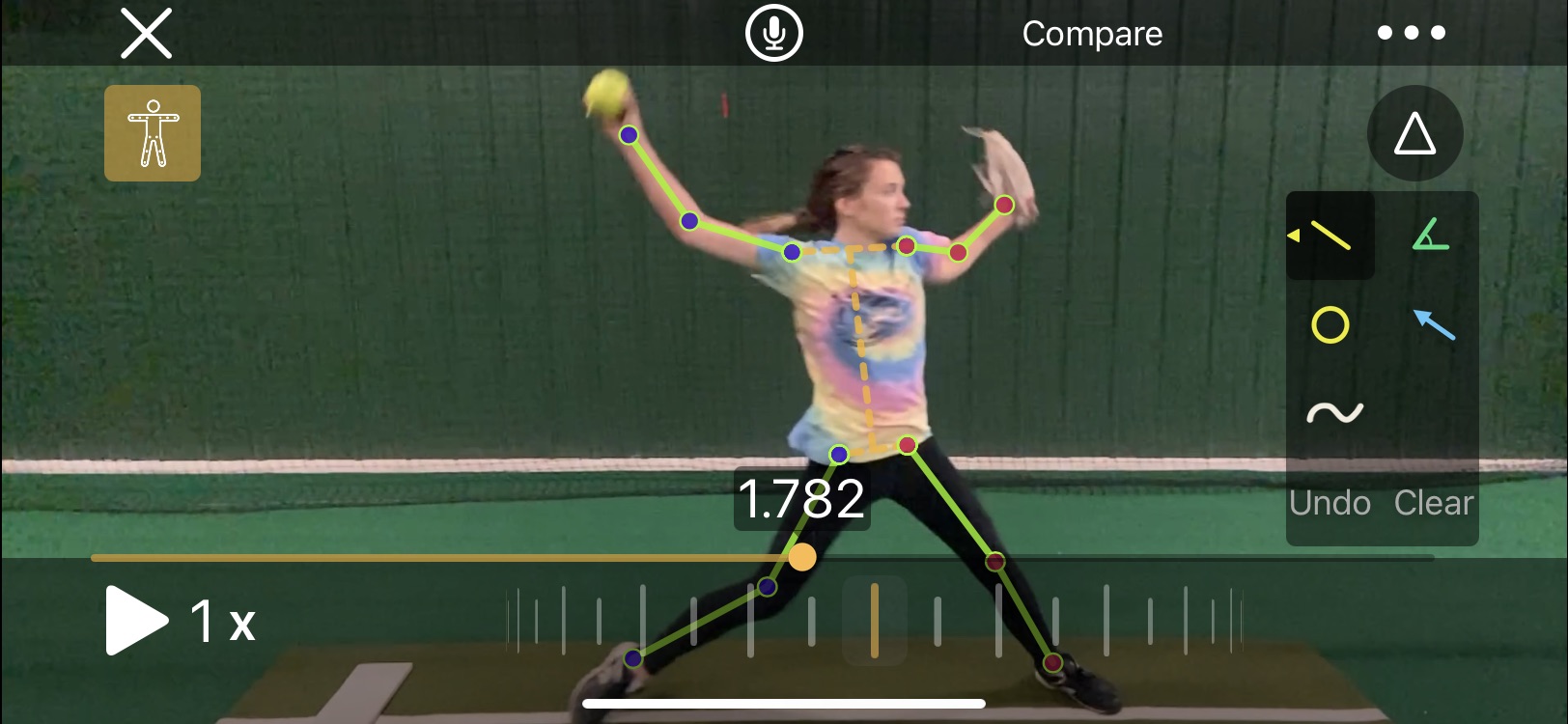
With the click of an icon OnForm will automatically mark every joint in the body and draw lines between them. Then, as you play or scrub the video, the skeleton lines will move with the player providing an unprecedented look at how how/she is moving through space. If the sequence of movements is important to you, you’re going to love this tool’s ability to display it.
Incidentally, the skeleton tracking overlay isn’t just for new videos. You can apply it to any video you’ve shot.
The toolset is rounded out by several additional capabilities, including:
- The ability to play videos through at full, 1/2, and 1/4 speed off a dropdown menu
- Two scrubbing tools – one which moves quickly through the movement, letting you go back and forth, plus a wheel that makes much finer movements so you can show subtle details
- An undo button to remove one line, circle, etc. at a time as well as a clear button to remove all markings
- A compare button that allows you to bring in a second video, whether it’s a previous video from that player or a pro example you’ve stored in a Reference Content folder, to provide a side-by-side comparison
- The ability to flip the video, which is handy if you want to, say, compare Cat Osterman or Monica Abbott to your right-handed pitcher
- Ability to trim the video to get rid of time between activities or other excess footage
- Editable titles and tags so you can mark exactly what was happening (such as which pitch a pitcher was throwing)
- Ability to edit the name, I suppose in case you got it wrong or the name changes
- Ability to save certain videos as favorites so you can find them more easily later
That’s a lot of capabilities, right? But we’re not done yet!
Recorded Analysis/Online Lessons
If you want to wait until later to analyze the video and then share the file with the player or parent, you can also do that. The Record feature gives you the option of recording the screen and live sound or just the screen.
You can pause the video in the middle or record straight through. Once it’s recorded it automatically plays a preview so you can check your work.
From there you can save the video as-is, trim the front or back, or discard it. If you’re happy with it you can share it directly through OnForm (if you’ve invited the player to join) or through email, messaging or some other app.
Pricing
Ok, now it’s time to get to the nitty-gritty. OnForm offers four different packages depending on your needs. Each comes with a one-week free trial so you can see whether it’s what you want. Be sure to double-checking pricing here since it may have changed since this blog post was written.
The first is a Free package that limits you to 10 videos in your account. If you don’t think you’ll be using it much, but want the option to shoot the occasional video, this one should work for you.
Next up is the Personal package, If you’re working with your own kids only (as opposed to coaching a team or being an instructor) this one should work for you. For $5/month or $49/year you can capture, store and analyze up to 500 videos as well as create up to 5 analysis videos in a 30-day period.
The Coach package (which is the one I have in case you’re interested) provides unlimited videos and analyses/voice over lessons for one coach, as well as allowing any invited athletes to upload unlimited videos to you for free. It also gives you the ability to create notes to go with each video and broadcast lists to reach multiple players at once. This package isn’t cheap, at $29/month or $299/year, but if you plan to use it a lot I think you’ll find it’s worth it.
Finally, OnForm offers the Team/Academy package, which includes everything in the Coach package along with the ability to create three (3) coach accounts rather than one so multiple coaches can access and use the same videos. That one is $69/month or $699/year. It’s probably best-suited to collegiate teams, large travel programs or facilities that offer teams.
My Take
So how is it in practice (no pun intended)? I think it’s tremendous, and a significant upgrade over the products I’ve used in the past.
Creating the videos and marking them up is fast, easy and reliable. They are really helpful with illustrating what is happening and what needs to be done. For pitchers I love being able to draw a single line and show the forward/backward tilt of their bodies.
As previously mentioned I love the way the videos are organized. Rather than having to come home and tag each video, they’re already in the right folders and available. I’ve even moved some videos into one of the Reference Content folders so I can easily call them up to show what famous fastpitch players do.
The analysis tools are easy to use as well, and I definitely love being able to easily discard a video and start over rather than having to wait for it to render (as I did in Coaches Eye) before I could delete one I knew went bad.
Do I wish it was cheaper? Of course, who wouldn’t? But the value is there, and OnForm is continuing to develop the product and add new features so as long as the value is there I think it’s worth paying the price.
Finally, there is their support. When I contacted them to ask why the skeleton tracking feature wasn’t showing up in my iPad they got back to me within 12 hours to explain you need an A12 chip or higher for that feature to be available.
Bummer, but at least they got back to me quickly which is great. They also have a way for users to request new features (I’m going to ask for a clock face drawing tool), and a blog to keep you up-to-date when something new is introduced.
I wholeheartedly recommend OnForm as a training tool for fastpitch softball players. As a bonus, you can use it for many other sports and activities as well, so if you have, say, a softball player and a golfer, one instance will work for both.
Check out the free one-week trial. I think you’re going to let what you find.
8 Tips for Getting the Most Out of Skill-Specific Clinics

I recently had the privilege of working with Rick and Sarah Pauly (Pauly Girl Fastpitch), along with several of the top pitching coaches in the U.S., at a pitching clinic hosted by Jay Bolden. There were two sessions: the first for beginning/intermediate pitchers that focused on the fundamentals of good mechanics, and a second for more advanced pitchers where we did a lot of data measurement using various technologies such as 4DMotion for overall mechanics and kinetic sequence, Diamond Kinetic Balls for spin direction and rates, Pocket Radar for speed, as well as stations that focused on improving the rise and drop.
It was quite an opportunity for the participants to learn about pitching. Yet when it was all over a few of us had a discussion about how some of them had squandered that opportunity.
So that’s what today’s blog post is about: some tips that will help future campers ensure they get the most from the time they spend. And their parents get the most from their investment.
Tip #1: Come with an open mind
Perhaps the most frustrating comment any instructor in a situation like that can hear is “I don’t do it that way.” Basically that says “I have my way of pitching, hitting, etc. and I don’t want to make any changes.”
Ok fine, but then don’t bother signing up for the clinic. If you’re already doing what you want to do you and have no interest in hearing other perspectives, or perhaps finding a better approach, then there’s no point in driving all that way and taking up three hours of your time.
Stay home and play like you want, and leave the spot open for someone else.
But really the value in a clinic like this is hearing perspectives and learning techniques that could help you become better than you already are. If you listen with an open mind, and try new things even if they’re different from what you’ve done before, you may find you like the new things better. And that they work better for you.
The more open you are to different techniques, or even different cues, than you’ve heard in the past, the more likely you are to find what works best for you.
Tip #2: Sign up for the right level
This one comes from my friend Shaun Walker, an innovative pitching coach with Next Level Softball in Bruno, West Virginia. When you’re signing up at a clinic that offers different levels, it’s important to be honest about your level of accomplishment in the skill being taught.
It’s not just about age. It’s also about what you can do with the ball in your hand. If you’re a 14U pitcher throwing 45 mph who has trouble hitting her spots even though you’ve been pitching for four years, the beginner/intermediate clinic will likely suit you better.
Because pitchers who struggle with control on their fastballs or can’t at least reach the average speeds for their age levels probably don’t need advanced instruction on the rise and drop. They need to improve their fundamentals first.
If you’re going to sign up for an advanced clinic, you should be able to throw decently hard (55+ mph), have a reliable offspeed pitch, and at least have a start on a movement pitch or two. You need a fairly high degree of proprioception (fancy word for body awareness) because the subtle adjustment required to spin the ball in different directions will be tough to accomplish without it.
If you sign up for an advanced clinic and are completely lost and unable to do the things that are required you’ve just wasted three hours of time (plus travel) along with the money you invested. Take that same time and money and invest it in the beginning/intermediate session and you’ll get a lot more out of it.
Tip #3: Use it to see if you/your daughter likes pitching
Becoming a fastpitch pitcher requires a lot of time and effort, and in most cases a significant investment in pitching lessons. Why go down that road if it turns out the player doesn’t actually like it?
Keeley Byrnes, a great pitching coach with Key Fundamentals in Oviedo, Florida says that the beginning clinics are a great way to find out if the player likes and wants to become a pitcher. You can go through some instruction, find out just how challenging it can be to become a pitcher, and determine if it’s a path you want to try without the huge time and money investment of private lessons.
The clinic structure is also more conducive to “sampling” because with multiple players there isn’t as much direct one-on-one contact – particularly important to those kids who are a little more shy. They can give it a try and see if it’s for them without drawing too much attention to themselves.
Tip #4: Pace yourself
The structure of a three-hour clinic is unlike most typical practices. I have seen so many kids come out like a bright comet in the sky, only to burn themselves out quickly and have nothing left by the end.
It gets even worse if you’ve signed up for both sessions at a multi-level clinic like the one last weekend. That’s six hours of pitching. Who does that on a regular basis?
Don’t feel the need to get as many reps in early as you can. Take your time and pace yourself. Your future (six hours from now) self will thank you.
Tip #5: Understand it’s ok to fail
We all hate to fail, especially when standing in a room filled with our peers (or competitors). Yet a clinic is the place to try out new things.
The problem with new things is we’re not good at them, so you’re probably going to fail more often than you’re used to.
That’s ok. This is the place to do it.

If the clinic is any good at all, the instructors will understand and will try to help you get better. They will love your willingness to put yourself out there and do the hard work required to change.
Do that, and the most likely result is that you walk out knowing how to become a better pitcher than you were when you walked in. And you’ll be more ready to try new things as they come along.
Tip #6: Parents should be curious – but resist the urge to interfere
We get it. It’s tough for parents to watch their kids struggle, and it’s tough to resist the urge to step in when it happens.
But don’t.
Shaun says the ideal parents at clinics are those who listen so they can help their kids later, but who don’t get in the way of the learning process during the clinics. They certainly don’t say, “Ah, don’t listen to her, just keep doing it the way I showed you after searching on “fastpitch pitching” on the Internet.
Instructors at a quality clinic will not only tell you what to do but why it’s important. I know Rick Pauly is a master at this.
How much to participate can be a challenge, especially for some parents. You’re going to know your kids better than the instructors do, and will spend a lot more time with them than the clinic instructors will.

But land the helicopter anyway. Listen and learn along with your player, ask questions if you don’t understand something, but otherwise stay out of the way. It’s the best value for your entertainment dollar.
Tip #7: Embrace the different ways of teaching from different instructors
Keeley correctly states that one of the challenges of one-on-one instruction is that they player is only hearing things from one person. That instructor has his or her way of teaching things, but there are many ways to say the same thing.
One of the advantages of a clinic with multiple instructors is the opportunity to hear different explanations for the same thing. While one may not resonate with a particular player, the next one might.
And even if none of them is exactly on the mark for how that player needs to learn, the combination of statements, as long as they’re all basically saying the same thing in different ways, will help the player translate the instruction into a form she can use.
The other advantage of the clinic setting is learning from other players.
The participants are likely to be broken into groups. If there is a group of three, for example, and only one of them understands the instruction, she can also help explain or demonstrate it to the other two.
I’ve seen plenty of great examples of one clinic participant helping another to learn. Both of them benefit.
Tip #8: Gain more exposure to new things
While this sounds similar to Tip #1, it’s more about learning about things or taking in feedback you’ve never received before.
A good case in point is the technology we used at the last pitching clinic. You may think you have a great rise or curve. But the Diamond Kinetics ball will measure and show exactly what spin speed and direction you have.
If your rise is working pretty well but you discover you have a 10:00 spin, you’ll know you have more work to do to get it closer to a 12:00 spin. Make that change and it will be even more effective.
The 4DMotion technology is also incredible. It can measure all types of parameters from simple sequences (are you decelerating Hips-Chest-Arm?) to the speed at which your forearm is decelerating as you release the ball (which indicates the efficiency of your energy transfer).
With hard data in hand you can make improvements that may not have shown up to the naked eye, or even on high speed video. All of which will lead you to becoming the best pitcher you can be.
Get the most out of it
Attending a quality clinic can be great, or even a game-changer, if you approach it with the right mindset. But it can also be a giant waste of everyone’s time and energy if you don’t.
In other words, you’ll want to do more than simply get the t-shirt as Ken Bergren, a pitching coach in Oregon says.
Follow these tips and you’re far more likely to walk out thinking “That was fantastic.” And inspired to go out and work even harder.
Great New Resource for Learning Pitch Movement

I’ve spoken in the past about Rick and Sarah Pauly’s High Performance Pitching courses. They have put together a great series of Beginner, Intermediate and Elite-level online training courses that give professional instructors and bucket parents alike the ability to learn from two of the best in fastpitch softball pitching.
Recently they released a brand new course for the Elite program called “Tips for Making a Ball Move.” (Click on the Elite tab to find it.)
In his usual friendly and accessible way, Rick walks through topics such as what order to learn movement (i.e., non-fastball) pitches, increasing spin rates on pitches and how to be effective with grips. Lots of great information, and best of all it’s FREE!
But there was a three-part set of lessons in there I thought would be particularly helpful for bucket parents. Two of the lessons cover different types of training balls, and the other one talks about other types of gadgets.
I think these are some very valuable lessons for a couple of reasons. One is that we all look at those things hoping to find a shortcut to helping our daughters/players/students pitch more effectively.
As Rick shows his personal collection I felt like a kid again going through baseball cards with my friends – got that, got that, got that, hmmm, that looks interesting. As much as I say I’m not a gadget guy I’ve certainly spent my fair share of money checking things out.
Rick walks through each of them, talking honestly about what he uses regularly and which balls or devices mostly collect dust on his shelf. Before you hit the “submit” button on Amazon or an individual website I highly recommend you check out this series of videos.
The good thing is Rick isn’t really passing judgment on the balls or devices as much as he is sharing his experience. Why that’s important is that while a ball or device may not have worked for him, it might be just the thing you need. After watching the videos you’ll get a better idea of whether they’re worth checking out.
For example, he talks about SpinForm softballs. They are great for helping pitchers learn the curve or rise. But in my experience they’re also great for teaching the overhand throw – especially for a player who tends to get side spin instead of 12-6 spin on her overhand throw.
It’s hard to miss whether the ball is being thrown properly or not, especially if you play catch with someone who does throw properly. That visual helps players figure out what they need to do to improve. If you pair up a pitcher working on her curve with a catcher who needs some spin help it’s a win-win.
And honestly, that’s the thing about these various balls and devices. None of them are necessarily good or bad. Just like drills, using them to achieve success has a lot to do with the coach and the student.
If you have a specific need and use the device properly, it may be valuable to you – even if it wasn’t to me. But if you don’t put in the work with it, or use it as intended, you’re probably going to find it one day covered in dirt and grime when you go to clean out your garage.
The nice thing about Rick’s videos is they give you an unbiased head start on determining whether whatever you’re thinking about purchasing will help solve the issue you’re trying to solve. And again, that course is free so even if you don’t watch the rest of the lessons you can pop in and get what you need.

So before you go off chasing the latest softball device rainbow, give those videos a look. It might just save you a few bucks you can use to pay for your next hotel stay.
P.S. Just FYI, no matter what device or tool you buy, they tend to work better when you use them regularly.