Daily Archives: October 2, 2026
Product Review: Fieldy AI Notetaker
Let me start this post by sharing that I have always had a tremendous memory. It’s nothing I had to work at either – from the time I was young until now I just have had an ability to pull up random facts and information on demand.
It’s what allowed me to score highly in tests in school (including those national fill-in-the-little-dots tests) and to absolutely slay in Trivial Pursuit, to the point where our extended family quit playing entirely because I could not only answer almost all of my own questions but all of their too. Winning through intimidation, baby!
But even I could get confused at times after a long day of lessons about what we worked on with a specific student, especially if I had two girls who were similar. I would know we did X; I just wasn’t sure whether it was with Felicia or Tiffany.

That’s why, when I started seeing ads for apps and devices that would listen in on my lessons and create a transcript along with an AI-driven summary of said transcript, I was intrigued. I knew some of my pitching coach friends had already made the leap and seemed to like it, but I still hesitated before finally pulling the trigger, afraid I might choose one that didn’t do what I needed it to do or quite frankly would be a pain to use in the way I wanted to use it post-lesson.
But as you can tell, or if you’re a regular listener to the From the Coach’s Mouth podcast where I talked about it on this episode, I went ahead anyway and got one – specifically the Fieldy AI Note Taker 3, the latest model from Fieldy. Mostly I got it because of those pitching coach friends who said they all loved it.
And in case you were wondering, I bought it myself and am not receiving any promotional or other consideration for this product review. It’s strictly me sharing something I am finding valuable.
The Basics
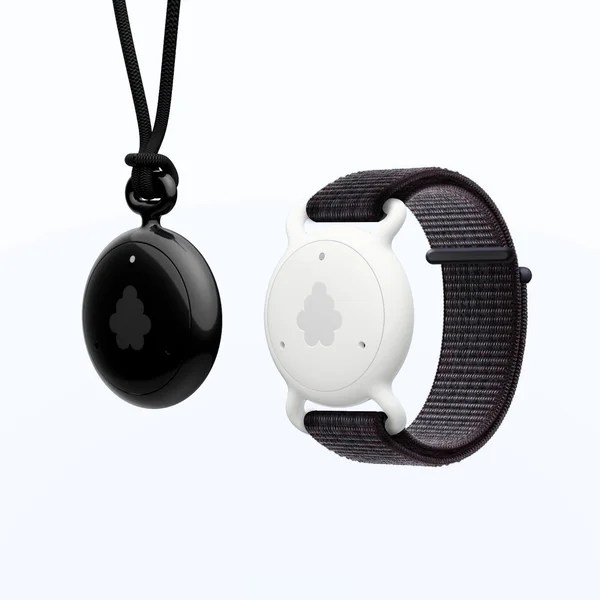
So what is Fieldy and how does it work? Fieldy is a small wearable device that you can wear in a variety of ways.
It comes with a small elastic band that you can wear around your neck, inside or outside of your shirt (I usually wear it outside), but you can also purchase a separate watch band so you can wear it on your arm. Since I already wear an Apple watch I’ve opted for the original neck band.
The neck band itself is held together by magnets so it’s easy to slip on and off. The device itself is quite small so you don’t really notice you have it on – at least I don’t. That also makes it easy to store in my car between lessons, at least while the temperatures are not at the extremes.
You also have to download their app (no surprise there) but it’s free and easy to use. More on that in a bit.
Like any Bluetooth device you first have to pair it with your phone or tablet for optimal performance. While it can record up to 3 hours locally, it’s better to pair it to a device with more storage capacity, especially if you have a long day ahead.
Once your Fieldy is paired you can train it to recognize your voice in about 5 minutes. That makes it easier when you’re looking back on conversations to tell who was speaking, at least for yourself.
Then, when you’re ready to use it, you just click the front of the unit and it starts recording. You’ll hear a single beep to confirm it started, but if you’re still not sure (especially early on) you can also look at the front to see a tiny LED; if it’s on, you’re good to go.
You can also confirm it’s running by checking the app on your phone. It will show whether it’s recording, and you can also use the app to start and stop recording.
When you’re done, you can either let it keep going to capture more conversations down the road or turn it off by clicking the button again if you want to fully separate the conversations. Pretty simple.
Transcription Capabilities and Summary
Once you start recording, the Fieldy listens in and creates a full transcription of everything that was said, separated by speaker – although that means unless you designate names it just says Speaker 1, Speaker 2, etc. The transcription can be a little wonky at times like any AI transcription, especially if you’re using words or concepts that are more specific to fastpitch, but overall it’s solid and good enough to get the gist of what was said.
The real value, though, is the summary it creates. Fieldy comes with several built-in summary templates that are oriented toward various uses, such as a business meeting, a phone call, a lecture, or even a casual conversation.
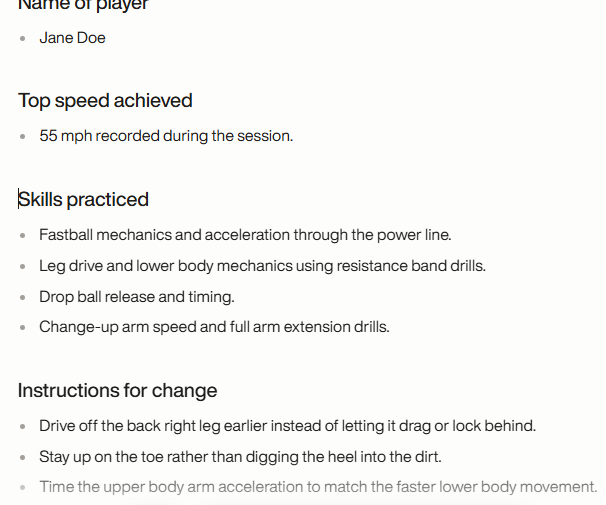
The template then takes the same basic information and organizes it for you in a way that it thinks makes the most sense for how you plan to use it.
But you can also create your own custom templates, either from scratch or by modifying an existing template, and save it under whatever name you choose. That way it’s putting the information you need right up front for you.
For example, my Softball Lessons template put’s the student’s name right up front so I know whose lesson it was (some of the phonetic spellings it comes up with are hilarious) and the highest pitch speed achieved if the lesson was with a pitcher. If it’s a hitting lesson, that section is left blank.
Of course, in order to populate that part of the summary you first have to announce what the highest speed has been so far; it’s not a mind reader. But as long as you remember to do that it will capture that information and put it up-front for me.
The same with anything else. One of my favorite parts of the summary is when it talks about the general atmosphere of the lesson.
I don’t really use that part but it is funny to look back and see the conversation was lighthearted and casual, or that the dad and I were discussing what TV shows we’re watching. So definitely be careful with what you say out loud.
In case you’re wondering, Fieldy’s website says it supports more than 100 languages, so if English isn’t your first language, or the one you use at practice, no worries. You’re covered.
And, since it’s great for overall note taking, if you want to give it to your daughter to use while she’s in school, there’s another justification for buying one (in case you need to convince a spouse you have to have it).
How I Use It
While I could leave it running throughout the entire time I’m doing lessons – Fieldy is good about figuring out when one lesson ends and another begins – I usually turn it on before each lesson and off at the end. That way each one is separated and I can be sure the information or instruction it captured is specific to each student.
As mentioned earlier, you have to be careful to spell out the information you want captured. For example, you can’t just say “Bring your arm to here” if you want to know exactly what you said.
Instead, you have to say, “Bring your arm to your hip” or “Keep your hands near your back shoulder.” It takes a little getting used to since a lot of instruction can be visual, but with a little time you’ll get used to it. I did.
When all my lessons are done and I’m ready to create my notes for the day, I open my PC and review the summaries on the desktop app. I have kept student notes in an Excel spreadsheet for a long time and like that way of organizing them, so I then have the task of moving key notes from the Fieldy app to the spreadsheet.
I would do this anyway, so I’m finding it to be a timesaver. I no longer have to ponder what was said and create everything from scratch. I usually write one or two lines freehand, and then start to copy and paste from Fieldy to Excel. Fieldy’s summaries are bulleted to I have to do a little manipulation to get the notes the way I want them, but it doesn’t take much work.
I can pick and choose selectively from the summary to keep it a little shorter, and I can also use the summary as a prompt to write my own notes if I want to organize the information a little differently or add other thoughts or reminders for next lesson. It’s all pretty simple and seamless.
My template also creates a list of Next Steps, which are good reminders of things I need to do, such as create a corrective exercise program for a player or apply a particular drill in the next lesson. As long as it’s said out loud it will be in the list. It’s also good for reminders to players of things to work on until the next lesson.
Once I’m done using the summary I usually delete the whole conversation. That way I don’t have to scroll through a bunch of old ones to get to the ones from that day. If you’re doing verbatim cut-and-paste of the transcripts or summaries that makes even more sense.
Other Use Cases
While I’ve been describing how I use Fieldy as a private coach, it makes sense for team coaches and parents as well. Maybe even moreso for team coaches because there is typically a lot more going on in a team practice with multiple players than in individual or even group lessons.
A team coach can run an entire practice as a single Fieldy session, with commentary about how particular drills are going, events that happened during practice, things to work on at the next practice, etc. If you attach a name to it you can also give yourself reminders to work on a particular skill with a particular player, send a follow-up about something, or plan ahead for the next practice.
Parents can use it at lessons to use as reminders of what their daughters should be working on during the week based on the coaching. If they stay for team practices they can make notes about what was worked on and what their daughter needs to work on based on that. They can even wear them at games if they want to create a quick list of how individual at-bats went or whether the ball and strike counts in the score book/GameChanger match up with what they saw on the field.
Fieldy is great for summarizing Zoom calls too, whether for fastpitch softball or business uses. I recently recorded a Zoom call with just the PC app (no wearable device), and it created a pretty good summary of everything that was talked about. That can come in handy if you’re trying to remember a particular point and don’t want to scan through an hour-long Zoom to find it.
Battery Life
I’ve been amazed at how much battery life the little Fieldy device has. While my lesson days haven’t been as long as usual due to a lot of my students doing school sports (love those multi-sport athletes) and the light fading at about 6:45 right now, I’ve been able to go for a week between recharges, and even then there was 30-40% battery life still available.

That may change once my lesson days get longer again in the winter, but even then I expect to get about a week’s worth of captures before it needs a recharge. The Fieldy comes with its own USB cable, or you can use one you already have lying around.
Cost
So, you’re thinking, that all sounds wonderful. But how much does it cost?
That’s a two-part answer. The first part is the Fieldy device itself.
I think it can vary from time to time, but right now as I write this a single Fieldy is $129. If you buy more than one (say, for two parents or a full coaching staff) the cost per unit is even less.
Here’s the thing, though. The basic unit only comes with 150 transcription minutes per month. That’s 2.5 hours for the math-challenged.
Clearly, that wasn’t enough for me doing lessons pretty much every day for several hours at a time, and it likely won’t be for coaches running more than one practice a week.
The good news is you can get unlimited minutes for a subscription fee of $15.99 per month if you subscribe for a full year, or $19.99 per month if you go month by month. I’m pretty sure I paid for the whole year up front and saved a little extra over the full year but paid per month plan. But I couldn’t confirm that on their website so be sure to check it out before you assume anything.
Wrapping It Up
So there you have it. I wasn’t sure if it was something I needed at first, but the more I use my Fieldy the more I’m glad I made the investment.
If capturing what happened at practice, at a game, or at a lesson accurately and completely is important to you, definitely give Fieldy a look.
Is it better than other AI note taking devices or apps? I don’t know, I haven’t tried them. But it sure does everything I need it to do, and I’ve only explored the basics.
If you have a different recommendation, be sure to let us know in the comments, especially if yours does something that wasn’t mentioned here.